


Overview
BD Rhapsody™ Sequence Analysis Pipelineは、クラウドベースのSeven Bridgesプラットフォームまたはローカル環境のいずれでもバイオインフォマティクス解析を実行できる、柔軟性に優れた解析ツールです。
BD Rhapsody™ Sequence Analysis Pipelineの特長
- 最先端のアルゴリズムを活用し、シングルセル・マルチオミクスデータの一次解析を高速に実行、迅速な結果取得と深い生物学的インサイトの獲得を支援します。
- クラウドベースプラットフォームによる直感的なユーザーインターフェースを採用しており、計算機科学やバイオインフォマティクスの専門知識に関わらず、容易にご利用いただけます。
- クラウド環境またはローカルインストール環境を選択可能。シングルセル・マルチオミクスデータ解析において、優れた利便性とアクセス性を提供します。
- 出力データは、SeuratやScanpyなどの下流解析ツールとの高い互換性を備えています。
BD Rhapsody™ Sequence Analysis Pipelineで生成された .Cellismo 出力ファイルは、 BD Cellismo™ Data Visualization Tool にインポートでき、二次解析およびデータの可視化に活用できます。
Pipeline Overview
シーケンス後、パイプラインはFASTQファイル、リファレンス(TargetedパネルまたはWTAゲノムアーカイブ)、AbSeqリファレンス(必要な場合)、および補足リファレンス(必要な場合)を入力として受け取り、細胞ごとの分子カウントと、パイプライン実行に関する各種メトリクスを生成します。
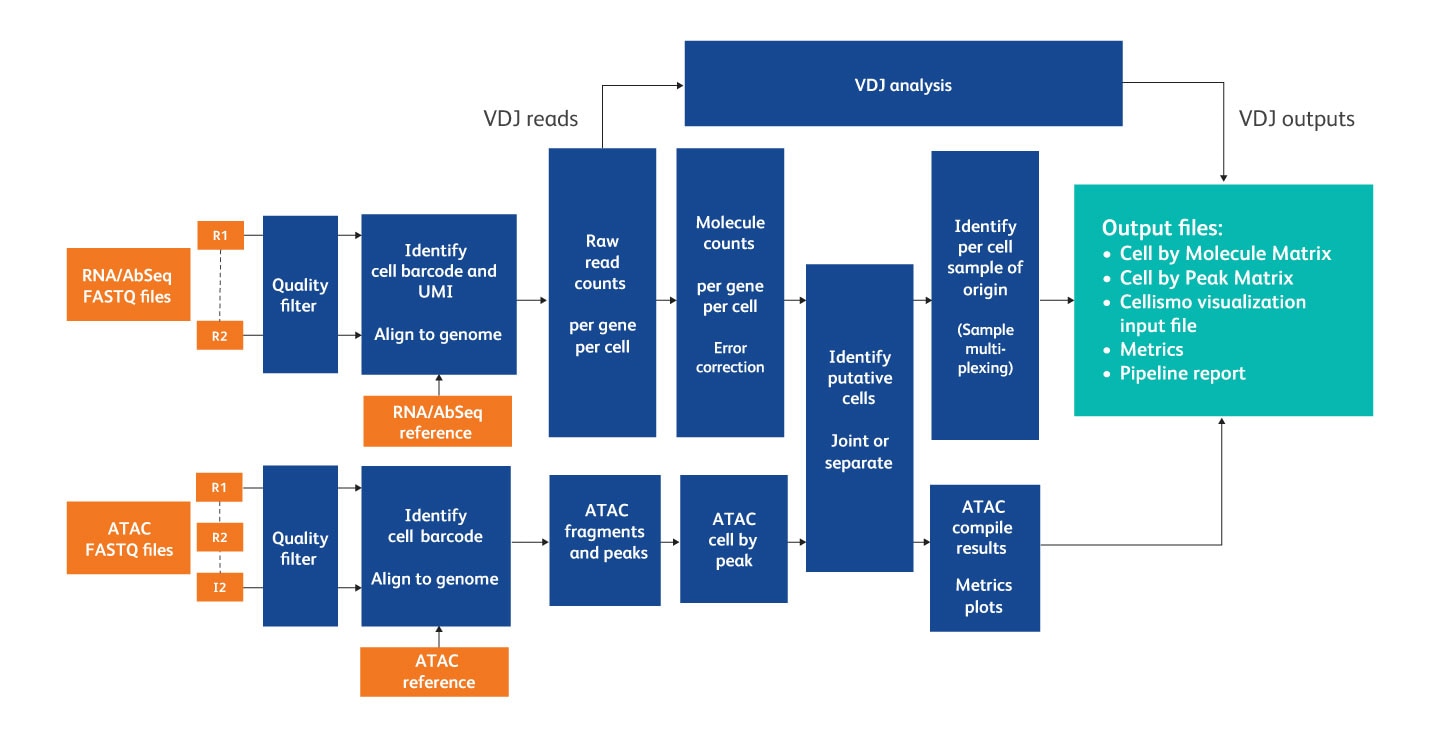
Overview of the steps in the analysis pipeline.
Features
- 無料: 生データをアップロードし、クラウド上でパイプラインを実行して、結果を無料でダウンロードできます。
- 高速: 10億リードのデータを3時間未満で処理できます。
- シンプル: 以下の製品に対応した統合パイプラインを提供します。 BD Rhapsody™ Whole Transcriptome Analysis Amplification Kit, BD Rhapsody™ Targeted mRNA Kits, BD Rhapsody™ TCR/BCR Next Multiomic Assays and BD Rhapsody™ ATAC-Seq Assays
Release Notes
-
Current Version: v4.0 | Release date: September 2026
Added
- VDJ:
- New ‘airr’ modality in the Cellismo output file containing the contents of the dominant contigs AIRR file, so VDJ results can be imported directly into Cellismo.
- Clonotyping is now performed, adding a new ‘clone_id’ column to the AIRR Dominant Contigs and Unfiltered Contigs files
- Additional constant (C) region alignment columns in the AIRR outputs: ‘c_support’, ‘c_sequence_alignment’, ‘c_sequence_alignment_aa’, ‘c_sequence_start’ and ‘c_sequence_end’
- New pipeline parameter:
- ‘Multiple_Alignment_Handling’ controls how reads that align equally well to more than one gene are treated: ‘Discard’ (default, previous behavior) or ‘Uniform Random’, which assigns the read to one of the candidate genes at random
- ‘Multiple_Alignment_Gene_Selection’ controls which gene is chosen for reads that map to multiple genes, either through multiple genomic alignments or through a single alignment that falls within overlapping genes: ‘Any Overlap’ (default) or ‘Most Base Overlap’.
- Non-pseudogene alignment prioritization. Reads aligning to two or more genes will prefer non-pseudogenes: when a read overlaps both pseudogene and non-pseudogene features, the pseudogenes are removed before the multiple alignment handling strategy is applied
- Pipeline Report:
- New gene body coverage plot for WTA assays
- New bioproduct type count table summarizing counts by gene biotype, with the same information also written to a new ‘_biotypeCounts.csv’ output file
- TCR/BCR - top 10 clonotypes listed for each receptor type
- Make Rhapsody Reference tool:
- GTF and FASTA validation. GTFs are checked for missing or empty ‘gene_id’, ‘gene_name’ and transcript_id’ attributes and for structural problems such as transcripts and exons that reference a gene with no corresponding gene feature. FASTA files are checked to confirm they contain the contigs referenced in the GTF annotation
- New optional input ‘Repair_GTF’, which attempts to automatically repair common fixable GTF problems and uses the repaired annotation for downstream processing
- New optional input ‘GTF_Validation_Complete_Mode’, which reports every error and warning found in the GTF instead of stopping at the first fatal error
- New optional input ‘Disable_FASTA_Validation’, to bypass the contig compatibility check between the FASTA and GTF files in rare cases where this is intended
- New optional input ‘Combine_Same_Gene_Names’, which merges genes that share a gene name but have different gene IDs. When it is off (default), chromosome, start and strand information is appended to duplicated gene names to keep them distinct
Updated- VDJ:
- UMI error correction up to 4x faster with substantially reduced memory use
- In the Cellismo output file, the VDJ per-cell columns are now attached to the ‘airr’ modality instead of ‘rna’
- ATAC: ‘Mean_Reads_per_Cell’ and ‘Pct_Reads_from_Putative_Cells’ are now calculated from useful reads rather than all FASTQ reads, matching how the equivalent RNA metrics are calculated
- Improved library name and read type determination from FASTQ file names and improved handling of the read identifier when pairing FASTQ files
- Make Rhapsody Reference tool:
- Underscores and colons are now removed from contig names, since Seurat rejects underscores in feature names and colons cause problems with the IGV browser in the Cellismo viewer
- ‘Filter_PARs’ is now an optional input
- Cellismo file generation no longer requires UTR annotations to be present
Fixed- VDJ:
- Read trimming now fails immediately on a non-zero exit code and logs the failing command. Also limited to 8 threads to avoid exceeding the open file handle limit
- Possible corruption of the single read contigs file, which multiple writer threads could write to at the same time
- Invalid ‘contig_id’ error in ‘VDJ_Compile_Results’ when a downsampled FASTQ produced no assembly results and the input reads were used as contigs
- Failure in ‘VDJ_Compile_Results’ caused by missing values during deserialization
- Pipeline failure when a FASTQ file contained very long reads.
- Failure in ‘AlignmentAnalysis’ caused by an incorrect VDJ-only check, which could leave the mRNA valid read files ungenerated and crash ‘GetDataTables’
- Cell calling failure when the last point of the curve was the only minimum.
- Incorrect false positive cell count reported in the pipeline report and ‘_CellLabelAlgorithmStats.csv’ when the refined cell calling second step was skipped because too many cells were flagged as noise
- Divide-by-zero errors in the Sample Tag logs and metrics when no putative cells were called
- Failure to generate Seurat and Cellismo objects when bioproduct names in ‘_Bioproduct_Stats.csv’ did not match the feature names in the object, which occurred for references whose GTF has no gene names
- Targeted pipeline failure caused by bioproduct names that look like integers
- Pipeline failure when gene biotype filtering was turned off during reference generation
- Pipeline Report:
- The read flow Sankey diagram is now displayed when no cells are called
- The mRNA cell calling plot, joint cell calling plot, and gene body coverage plot are now displayed when no cells are jointly called
- Sankey diagram nodes could be connected incorrectly when a library name matched one of the diagram node names
- ATAC: pipeline failure when the reference GTF contained features with a missing gene biotype
- VDJ:
-
Previous Version: v3.0 | Release date: October 2025
Added
- ATAC:
- Gene Activity output—new modality in the .Cellismo output file and also a separate MEX output file. Gene activity is a Gene-by-Cell matrix, where counts are number of transposase cut sites in the gene body or 2,000 bases upstream of the gene start position
- Transcription factor motif output—new modality in the .Cellismo output file and also a separate MEX output file. This is a TFmotif-by-cell matrix, where values are z-scores of the enrichment of each TF motif
- VDJ
- New assembly algorithm improves speed of this step by up to 23 fold (range 7x-23x), enabling the processing of billions of TCR/BCR reads. Metrics are generally equivalent or slightly better.
- VDJ only pipeline—able to provide only TCR and/or BCR FASTQs and get a cell call and VDJ results. Sample multiplexing with VDJ only is also supported. VDJ in combination with a mRNA assay is still recommended for better cell calling and identification.
- New pipeline node to downsample data to calculate a sequencing saturation curve and median genes per cell curve, which are output on the pipeline report
- Make Rhapsody Reference tool:
- Added an optional input for Transcription Factor Motif PFM file
- Will now filter out readthrough transcripts and genes with only readthrough transcripts. Added optional parameter to turn off this filtering
- Added optional parameter to filter out Y chromosome Pseudo-Autosomal Regions from Human reference build 38
- Pipeline Report:
- New Read Flow diagram, showing a sankey diagram of read filtering steps for each library and for each of the RNA and/or ATAC modalities
- New Sequencing Saturation calculator to enable calculation of required total reads to achieve a target saturation value
Updated
- VDJ
- _VDJ_perCell.csv file CDR3 columns are updated to use CDR3 junction instead of CDR3 alone, resulting in the inclusion of canonical amino acids
- _VDJ_perCell.csv file added full length pairing columns
- New column in AIRR outputs "junction_anchored_aa"—a direct translation of only the CDR3 nucleotide sequence, not influenced by upstream frameshifts
- Update constant region gene identification to prevent mismatched chain types
- Removed PyIR wrapper and call IgBlast directly
- Basic putative cell calling algorithm updated to fix several edge cases and get more precise cell calls. Increase in putative cell number of ~1% is typical. Use of the Expected Cell Count parameter is highly encouraged
- Pipeline Report:
- Various metric alert updates
- Mean bioproducts per cell added to summary section
- Gene expression _MolsPerCell MEX output now contains Ensembl IDs as well as Gene symbols
- Improved library name determination from FASTQ file names
- More aggressive cleanup of polyA sequence in reads to prevent spurious alignments
- Make Rhapsody Reference tool: Extra Sequence input is now included in the BWA-Mem index
- Seven Bridges CWL: Instance types updated to be more performant, and increase size of instances for ATAC related nodes
- ATAC peak annotation now uses transcript features rather than gene features, which better classifies peaks when a gene has multiple transcription start sites
- .Cellismo output file now contains GTF data for genes
- Dimensionality reduction threshold updates: Below 100,000 cells, both t-SNE and UMAP coordinates are generated. Between 100,000 and 300,000 cells, only UMAP coordinates. Above 300,000 cells, a sub-sample of 300,000 cells will be selected and UMAP coordinates generated.
Fixed
- AlignmentAnalysis node was not getting an early cell count estimate, which could cause downstream node scaling issues
- TCR/BCR node failure when the number of valid TCR or BCR reads exceeded 2,147,483,647 reads
- Pipeline Report error when exact cell count parameter specified
- Pipeline Report error when CITE-seq/AbSeq only datasets are run
- Targeted RNA pipeline did not output a DBEC MEX file
- ATAC pipeline could get stuck in QualCLAlign_ATAC for some reference genomes with large numbers of contigs
- Rare issue where an ATAC peak could exceed the length of the contig on which it resides
- Improved handling chromosome names with unexpected characters
- Failure in GenerateSeurat node when there is only 1 AbSeq input
- Rare failure cause by poor quality read 1 data creating a race condition
- Rare failure in ATAC node caused by incorrect BWA-MEM2 binary selection
- ATAC pipeline failure when more than one ATAC library was present in the pipeline inputs
- ATAC pipeline failure when using sample tags or an "Extra seqs" input
- ATAC pipeline discrepancy in putative cell numbers in different output files.
- ATAC:
Get Free Access to the Pipeline
Cloud-Based Version
- Go to Velsera.com
- Click Request Access. In the request access window, enter your email address to receive an email invitation to the Seven Bridges Genomics platform within 24 hours.
- Click the link in the email invitation and complete the registration. Seven Bridges Genomics displays the dashboard with the demo projects.
Local Version
- Go to bitbucket.org/CRSwDev/cwl. If necessary, create a Bitbucket account.
- In the left pane, click Downloads > Download Repository. The CWL and YML files will download.
- Unzip the archive. Each folder within the archive is named after the pipeline version to which it corresponds.
Resources
-
User's Guide
(1)


For Research Use Only. Not for use in diagnostic or therapeutic procedures.